Case Management Guide
Handle customer support requests, issues, and service enquiries from creation through to resolution. Understand how Dove365 CRM — Starter structures the support workflow.
Structured support for every customer
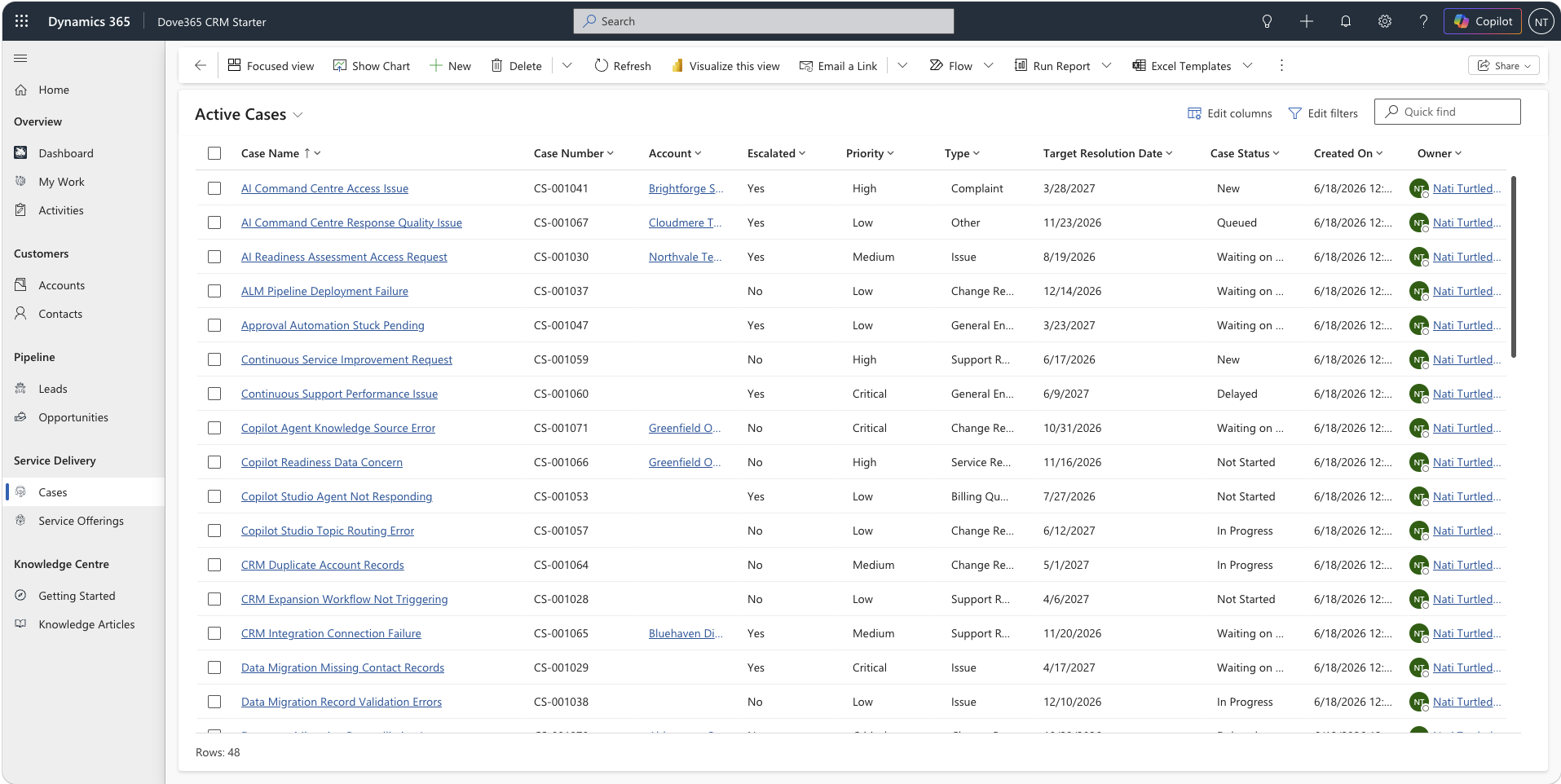
A case tracks a customer support request, issue, complaint, billing query, change request, or general service enquiry. Cases connect your customers to your team’s response and create a permanent, accountable record of what happened.
Full customer context
Every case links to an account, contact, and optionally an opportunity or service offering. Your team always knows who the customer is, what they’re asking about, and what the full relationship context is.
Priority-driven workflow
Cases are assigned a priority — Low, Medium, High, or Critical — and a target resolution date. This helps your team triage effectively, manage workload, and set realistic expectations with customers.
Complete interaction history
The timeline records every interaction — notes, calls, emails, and internal comments — so anyone picking up a case has full context without asking the customer to explain themselves again.
Triaging cases by priority
Assign a priority to every case at creation. Priority determines how urgently a case should be addressed and helps your team manage workload across multiple open cases at the same time.
From new case to resolution
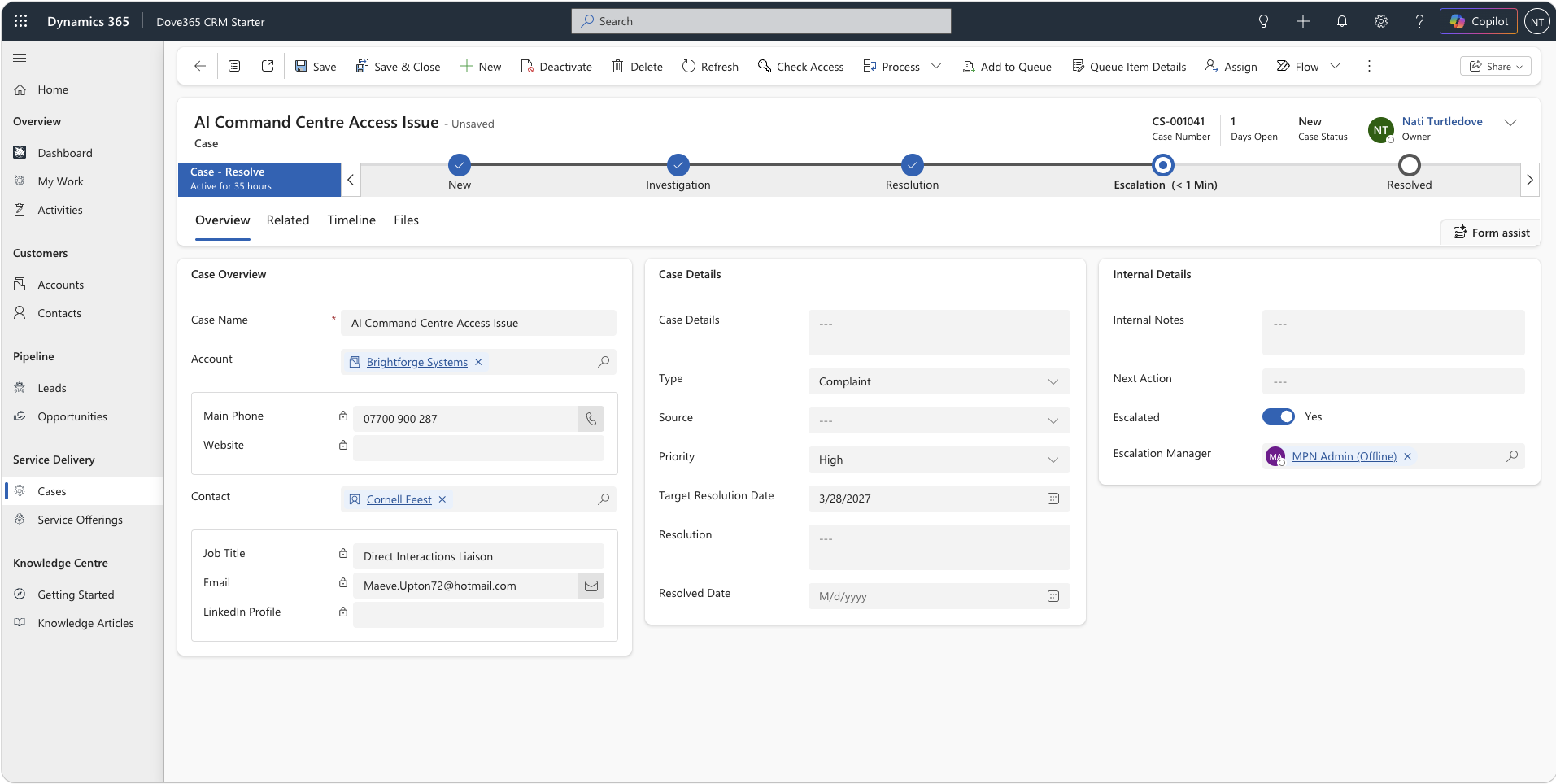
Dove365 CRM — Starter guides cases through a structured process that ensures consistent handling — from initial logging through investigation, escalation where needed, and final resolution.
New
Create the case with all available details: name, account, contact, type, priority, source, target resolution date, and initial description.
Investigation
Record internal notes, update next action, and log all communication on the timeline. Keep case status current throughout.
Resolution
Record the resolution details and next action. Determine whether the case requires escalation. If so, begin the escalation process; otherwise, proceed to Resolved.
Escalation
If needed, mark the case as escalated, assign an escalation manager, and record the reason and notes. Escalated cases require oversight.
Resolved
Record the resolution details and resolved date. The case is closed with a clear record of what was done, when, and by whom.
Building an effective support process
Log cases for every support interaction
Even for quick fixes, a case record provides accountability and contributes to reporting on support volume, type, and resolution time over the long term.
Set target resolution dates at creation
A target date creates accountability internally and helps manage customer expectations. Use it consistently so reporting on resolution times reflects reality.
Record all communication on the timeline
Every call, email, and internal note should be on the case timeline. This protects your team if a customer disputes what was agreed and helps any colleague covering an open case.
Use case types consistently for reporting
Consistent use of case types — support, billing, change request, complaint, enquiry — over time reveals patterns in customer issues and informs service improvements.
Don’t leave cases open indefinitely
Resolve or cancel cases as soon as the work is complete. Open cases that are actually resolved inflate your active case count and make reporting less meaningful.
Link cases to service offerings
Attaching a service offering to a case helps categorise support work by service type, supporting service-level analysis and capacity planning as your team scales.
Continue learning
Opportunity Management
Manage the sales pipeline that feeds your support team — from qualified deal through to won and onboarded customer.
Activity Tracking
Log calls, emails, and notes against cases. Understand how the timeline builds your complete support interaction history.
User Management
Understand how to manage team access so the right people have visibility of the cases relevant to their role.
Ready to see Dove365 CRM — Starter in action?
Book a free demo and see how Dove365 CRM — Starter can work for your business inside Microsoft 365.